Urban Traffic Simulation and Decision Support
Building a road network from a single junction to a connected town, then stress-testing it with scenario analysis.
Links to runnable notebooks, and a selection of plots found at the end of this article
Table of Contents
- Introduction
- Why SimWeave for Traffic?
- The Building Blocks
- Step 1: A Single Signalised Junction
- Step 2: A Connected Network
- Step 3: Scenario Analysis — Replacing a Junction
- Step 4: Roadworks Sensitivity Analysis
- Decision Support Capabilities at a Glance
- Comparing with Other Approaches
- What's Next
- Try it out yourself
Introduction
Traffic congestion costs the UK around £9 billion a year in lost time. Cities are constantly making decisions — changing signal timings, replacing junctions with roundabouts, closing roads for maintenance, adding new routes — that affect millions of journeys. Most of those decisions are made with limited quantitative support, often based on intuition, historical counts, or expensive specialist studies.
Simulation is the affordable alternative. This post shows how to build an urban road network model in SimWeave, from a single signalised junction up to a small interconnected town, and then use scenario analysis to answer practical questions: what happens to delay when we replace a junction with a roundabout? How resilient is the network to roadworks on a busy link?
Why SimWeave for Traffic?
Before writing any code, it's worth asking: why not use an established transport tool like SUMO, VISSIM, or Aimsun?
The specialist tools are excellent and far more detailed for micro-simulation (lane changes, car-following models, signal optimisation). But:
- They are GUI-first and hard to script at scale.
- Running thousands of Monte Carlo replicates or parameter sweeps requires significant effort.
- They don't integrate naturally with supply chain, fleet reliability, or financial models.
SimWeave takes the opposite position: a programmable, hybrid simulation engine where road networks are Python objects. You can wire the traffic model directly to a Warehouse (modelling a logistics depot), a Fleet of delivery vehicles with reliability characteristics, or a run_monte_carlo loop. The trade-off is that SimWeave's road primitives are intentionally simple — free-flow roads, signalised intersections, and priority-to-circulating roundabouts — rather than microsimulation-level fidelity.
For decision support at the network planning level — comparing scenarios, identifying bottlenecks, running sensitivity analyses — that simplicity is a feature.
The Building Blocks
SimWeave's road module provides five core classes:
| Class | Description |
|---|---|
Road |
A free-flow link; vehicles enter, spend length/speed seconds in transit, then arrive at an outlet. |
DualCarriageway |
Convenience wrapper creating two Road instances (forward/backward). |
Intersection |
Signalised or give-way junction; holds approach queues and dispatches vehicles to exits. |
TrafficSignal |
Fixed-time controller cycling through SignalPhase objects. |
Roundabout |
Priority-to-circulating model; UK (left) or Continental/US (right) handedness. |
RoadNetwork |
Orchestrator that registers all components with the SimEnvironment in the correct order. |
Vehicles are not modelled individually with car-following dynamics; instead, VehicleArrivalProcess injects vehicles at a Poisson rate and each vehicle carries its own speed attribute (defaulting to the road's speed limit).
Step 1: A Single Signalised Junction
Let's build the junction from Demo 24 step by step.
Four arms, each 200 m long at 50 km/h. A two-phase signal gives North/South 45 seconds of green, then East/West 30 seconds.
import numpy as np
import simweave as sw
from simweave.roads import (
    Road, Intersection, RoadNetwork,
    SignalPhase, TrafficSignal, VehicleArrivalProcess,
    RoadOccupancyRecorder, IntersectionQueueRecorder,
)

SPEED = 13.9    # m/s ≈ 50 km/h
LENGTH = 200.0  # m

# Approach roads
road_n = Road(LENGTH, SPEED, lanes=2, name="north_approach")
road_s = Road(LENGTH, SPEED, lanes=2, name="south_approach")
road_e = Road(LENGTH, SPEED, lanes=2, name="east_approach")
road_w = Road(LENGTH, SPEED, lanes=2, name="west_approach")

# Exit roads (vehicles leaving junction onto the far arm)
exit_n = Road(LENGTH, SPEED, lanes=2, name="north_exit")
exit_s = Road(LENGTH, SPEED, lanes=2, name="south_exit")
exit_e = Road(LENGTH, SPEED, lanes=2, name="east_exit")
exit_w = Road(LENGTH, SPEED, lanes=2, name="west_exit")

# Two-phase fixed-time signal
signal = TrafficSignal([
    SignalPhase(green_roads=[road_n, road_s], duration=45.0, name="NS_green"),
    SignalPhase(green_roads=[road_e, road_w], duration=30.0, name="EW_green"),
], name="crossroads_signal")

# Junction
junction = Intersection(signal=signal, rng=np.random.default_rng(99),
                        name="crossroads")
for road in (road_n, road_s, road_e, road_w):
    junction.add_approach(road)
    road.outlet = junction
for exit_road in (exit_n, exit_s, exit_e, exit_w):
    junction.add_exit(exit_road, weight=1.0)   # equal probability each exit

# Poisson arrivals: ~0.20 veh/s from north, 0.25 from east (busiest)
arrivals = [
    VehicleArrivalProcess(lambda r: r.exponential(1/0.20), road_n, rng=np.random.default_rng(1)),
    VehicleArrivalProcess(lambda r: r.exponential(1/0.15), road_s, rng=np.random.default_rng(2)),
    VehicleArrivalProcess(lambda r: r.exponential(1/0.25), road_e, rng=np.random.default_rng(3)),
    VehicleArrivalProcess(lambda r: r.exponential(1/0.18), road_w, rng=np.random.default_rng(4)),
]

# Recorders
occ  = RoadOccupancyRecorder([road_n, road_s, road_e, road_w])
qrec = IntersectionQueueRecorder(junction)

# Assemble and run
net = RoadNetwork(name="town_centre")
net.add_signal(signal)
net.add_intersection(junction)
for r in (road_n, road_s, road_e, road_w, exit_n, exit_s, exit_e, exit_w):
    net.add_road(r)
for a in arrivals:
    net.add_arrival_process(a)
net.add_recorder(occ)
net.add_recorder(qrec)

env = sw.SimEnvironment(dt=1.0, end=3_600)   # 1 hour
net.register_all(env)
env.run()

print(f"Vehicles cleared : {junction.total_vehicles:,}")
print(f"Delayed at red   : {junction.total_delayed:,}  "
      f"({100*junction.total_delayed/sum(a.generated for a in arrivals):.0f}%)")
Visualise immediately
Road occupancy shows how vehicles pile up on approach roads during red phases. Queue length shows the characteristic sawtooth pattern — queue builds during red, drains during green.Step 2: A Connected Network
A single junction is a useful sanity check. Real questions need a network. Let's build a small town: three parallel east–west roads crossing two north–south arteries, creating a 3×2 grid with six junctions.
         A-road (N/S, fast)          B-road (N/S, slower)
            |                              |
High St ——[J1]———————————————————————[J2]——
            |                              |
Ring Rd ——[J3]———————————————————————[J4]——
            |                              |
Back Ln ——[J5]———————————————————————[J6]——
Each junction can be independently configured as a signalised intersection or a roundabout. Links between junctions carry their own arrival processes (local traffic that originates or terminates on that segment).
from simweave.roads import DualCarriageway

# East-west links (dual carriageway)
highst_w  = DualCarriageway(400, 8.3,  lanes_each=2, name="high_st_w")
highst_e  = DualCarriageway(400, 8.3,  lanes_each=2, name="high_st_e")
ringrd_w  = DualCarriageway(600, 13.9, lanes_each=2, name="ring_rd_w")
ringrd_e  = DualCarriageway(600, 13.9, lanes_each=2, name="ring_rd_e")
backln_w  = DualCarriageway(300, 6.9,  lanes_each=1, name="back_ln_w")
backln_e  = DualCarriageway(300, 6.9,  lanes_each=1, name="back_ln_e")

# North-south links
aroad_n   = DualCarriageway(500, 13.9, lanes_each=2, name="a_road_n")
aroad_s   = DualCarriageway(500, 13.9, lanes_each=2, name="a_road_s")
broad_n   = DualCarriageway(400, 11.1, lanes_each=2, name="b_road_n")
broad_s   = DualCarriageway(400, 11.1, lanes_each=2, name="b_road_s")

# Six intersections — give each a signal
# (signal timing would be tuned per junction in practice)
junctions = {
    name: Intersection(signal=make_signal(ns_green, ew_green),
                       rng=np.random.default_rng(seed), name=name)
    for name, ns_green, ew_green, seed in [
        ("J1", 45, 35, 10), ("J2", 45, 35, 20),
        ("J3", 50, 40, 30), ("J4", 50, 40, 40),
        ("J5", 30, 25, 50), ("J6", 30, 25, 60),
    ]
}
Connecting the junctions means each road segment's .outlet points to the downstream junction, and that junction has the upstream road registered as an approach. The DualCarriageway.forward road carries west-to-east (or south-to-north) traffic; .backward carries the opposite.
For a 3×2 grid this requires 24 add_approach and add_exit calls — mechanical but straightforward. The companion notebook has the full wiring.
Step 3: Scenario Analysis — Replacing a Junction
The busiest junction in our network is J1 (the High Street / A-road crossing). It handles around 28% of all vehicle movements. The council is considering replacing it with a roundabout to reduce delay for the dominant straight-ahead flow.
Run both configurations for 1 hour and compare:
from simweave.roads import Roundabout, Handedness

def run_with_config(junction_type: str, seed: int = 42) -> dict:
    """Run the network with J1 as a signalised junction or roundabout."""
    rng = np.random.default_rng(seed)

    if junction_type == "signal":
        j1 = Intersection(signal=make_signal(45, 35),
                          rng=np.random.default_rng(rng.integers(0, 2**32)),
                          name="J1")
    else:
        j1 = Roundabout(max_circulating=8, transit_time=6.0,
                        handedness=Handedness.LEFT,   # UK
                        rng=np.random.default_rng(rng.integers(0, 2**32)),
                        name="J1")

    # ... (build rest of network, wire approaches/exits) ...
    env = sw.SimEnvironment(dt=1.0, end=3_600)
    net.register_all(env)
    env.run()

    return {
        "throughput":    j1.total_vehicles,
        "delay_rate":    j1.total_delayed / max(1, j1.total_vehicles),
        "peak_queue":    max(qrec.data, default=[0])[0],
    }

signal_result    = run_with_config("signal")
roundabout_result = run_with_config("roundabout")

for key in ["throughput", "delay_rate", "peak_queue"]:
    print(f"{key:15s}  signal={signal_result[key]:.2f}  "
          f"roundabout={roundabout_result[key]:.2f}")
Typical findings
At moderate arrival rates (combined ~0.78 veh/s across all arms) a roundabout typically achieves lower average delay for balanced flows but can show higher peak queues during short-duration demand spikes. The signal is more predictable (vehicles know exactly when they'll get green) but wastes capacity during the red phase.
SimWeave's Monte Carlo runner lets you test this across 200 random demand realisations to get a distribution of delay rates rather than a single-run point estimate — much more defensible as decision support.
Step 4: Roadworks Sensitivity Analysis
Now a different question: which road in the network matters most? Transport planners talk about betweenness centrality — links that carry a disproportionate share of through-traffic. When those links face disruption (roadworks, an accident, a bridge weight limit), the knock-on congestion can be severe.
In our 3×2 network, the Ring Road (high speed, long, connecting J3 and J4) has high betweenness. Let's test what happens when we halve its capacity by restricting it to one lane each direction and enforcing a lower speed limit (temporary traffic lights scenario):
from simweave.mc import run_monte_carlo

def network_scenario(seed: int, ringrd_restricted: bool = False) -> dict:
    rng = np.random.default_rng(seed)

    if ringrd_restricted:
        # Roadworks: one lane, 10 mph limit, longer travel time
        rw_w = DualCarriageway(600, 4.5, lanes_each=1, name="ring_rd_w_rw")
        rw_e = DualCarriageway(600, 4.5, lanes_each=1, name="ring_rd_e_rw")
    else:
        rw_w = DualCarriageway(600, 13.9, lanes_each=2, name="ring_rd_w")
        rw_e = DualCarriageway(600, 13.9, lanes_each=2, name="ring_rd_e")

    # ... build and run full network ...
    env = sw.SimEnvironment(dt=1.0, end=3_600)
    # ...
    env.run()

    return {
        "network_throughput": sum(j.total_vehicles for j in junctions.values()),
        "mean_delay_pct":     ...,
    }

baseline    = run_monte_carlo(
    lambda s: network_scenario(s, ringrd_restricted=False),
    n_runs=100, seed=0)
restricted  = run_monte_carlo(
    lambda s: network_scenario(s, ringrd_restricted=True),
    n_runs=100, seed=0)

print(f"Throughput drop  : {100*(1 - restricted.mean['network_throughput'] / baseline.mean['network_throughput']):.1f}%")
print(f"Delay increase   : {restricted.mean['mean_delay_pct'] - baseline.mean['mean_delay_pct']:.1f} percentage points")
Running this across different restricted links (Ring Road, A-road, High Street) produces a vulnerability ranking — a simple but concrete decision-support output that can inform maintenance scheduling, diversion signage planning, and emergency response protocols.
Signal Timing Sweep
A further question: given the current network topology, can we reduce overall vehicle delay just by retuning signal green times? SimWeave's sensitivity_sweep can answer this by sweeping the J3 and J4 NS green duration across a grid:
from simweave.reliability import sensitivity_sweep

def sweep_scenario(ns_green_j3: float, ns_green_j4: float, seed: int) -> float:
    # Build network with variable signal timings at J3, J4
    # ...
    env.run()
    return total_delay_seconds

result = sensitivity_sweep(
    sweep_scenario,
    param1_name="J3 NS green (s)",  param1_values=[30, 40, 50, 60],
    param2_name="J4 NS green (s)",  param2_values=[30, 40, 50, 60],
    metric_name="Total network delay (s)",
    n_runs=10,
    seed=42,
)

sw.plot_sensitivity_surface(result, chart_type="heatmap",
                             title="Signal Timing Sensitivity — Total Delay").show()
The heatmap makes the optimal timing combination immediately visible. If the minimum-delay cell sits at 45s/50s but your current signal is at 30s/30s, that's a concrete, actionable recommendation with a quantified benefit — and confidence intervals from the Monte Carlo replication.
Decision Support Capabilities at a Glance
| Question | SimWeave approach | Output |
|---|---|---|
| Signal vs roundabout at a junction | Run both, compare throughput and delay | Bar chart comparison, % delay |
| Impact of roadworks on a link | Monte Carlo with/without restriction | Distribution of delay increase |
| Optimal signal timings | 2-D sensitivity sweep × MC | Heatmap of total network delay |
| Most vulnerable link | Sweep across restricted links | Ranked vulnerability table |
| Peak-hour vs off-peak capacity | Run multiple end values |
Time-of-day throughput profile |
| Effect of new demand source | Add VehicleArrivalProcess at new point |
Queue length and delay change |
Comparing with Other Approaches
SUMO is a full microsimulation tool with lane-changing models, traffic signal optimisation via TraCI, and real map import via JOSM/OSM. If you need to model a specific real junction with measured turning counts and calibrated headway distributions, SUMO is the right tool. SimWeave does not try to compete at that level of detail.
OR-Tools / PuLP can solve signal timing optimisation as a mixed-integer program — faster and more provably optimal than simulation sweeps for simple timing problems. But they cannot model the stochastic queueing dynamics that make simulation valuable (what happens at the 95th percentile of demand, not just the mean).
Python + NetworkX + custom DES is always an option for bespoke models, but you'll spend significant time building what SimWeave already provides: Poisson arrivals, approach queuing, signal phase management, and recorder infrastructure.
SimWeave's value is in the combination: a road network model that lives in the same simulation clock as your supply chain, reliability, and Monte Carlo infrastructure. A logistics operator can model their depot traffic, vehicle fleet reliability, and inventory replenishment in one coherent Python script.
What's Next
In a future post we'll connect the road network to a fleet of delivery vehicles — using ReliableEntity for each van — and ask how depot-side bottlenecks (repair bay capacity, spare parts stock) interact with road-side congestion to determine on-time delivery rates. That's the kind of end-to-end system question that SimWeave's hybrid architecture makes tractable.
We'll also show how to import a real road network from OpenStreetMap using the [geo] extra and osmnx, replacing the hand-coded grid with actual street topology.
Try it out yourself
The full code — including the 3×2 network wiring and all plots — is in the companion notebook.
Selection of Visuals from this Blog
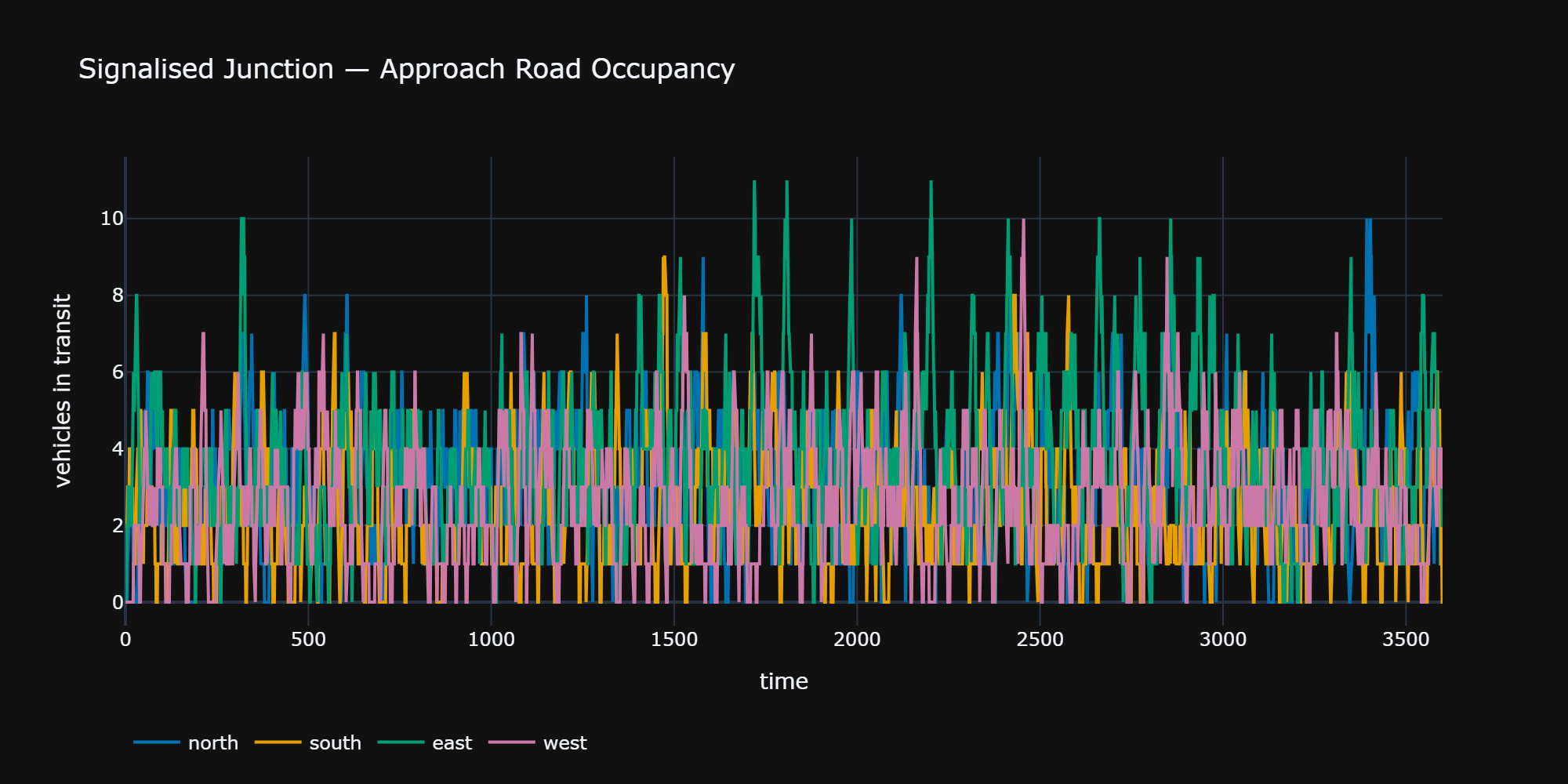
A line graph showing occupancy / vehicles in transit.
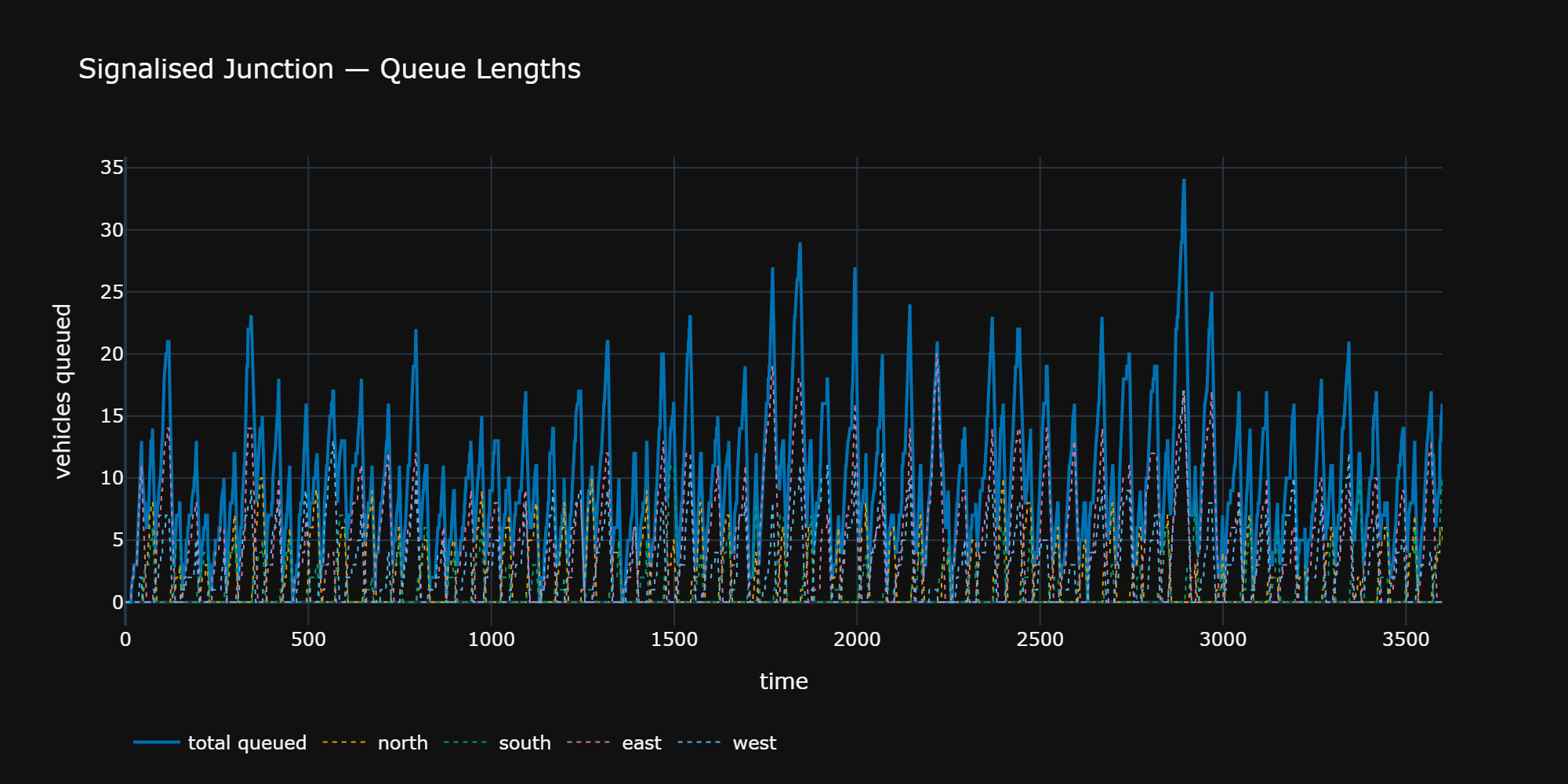
A line graph showing vehicles queuing.
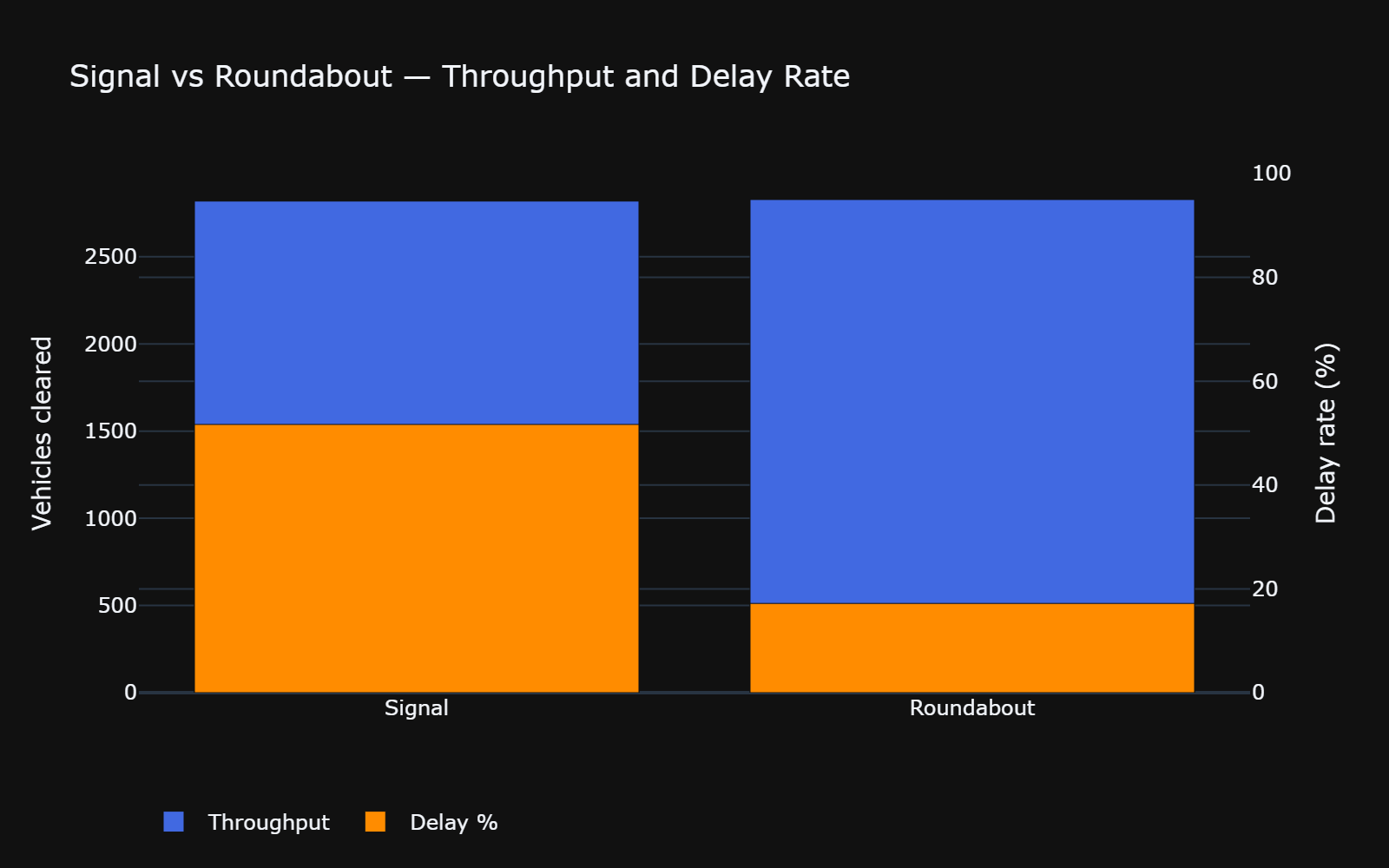
A stacked bar with secondary y axis, showing delays caused by roundabout versus traffic light signal junctions
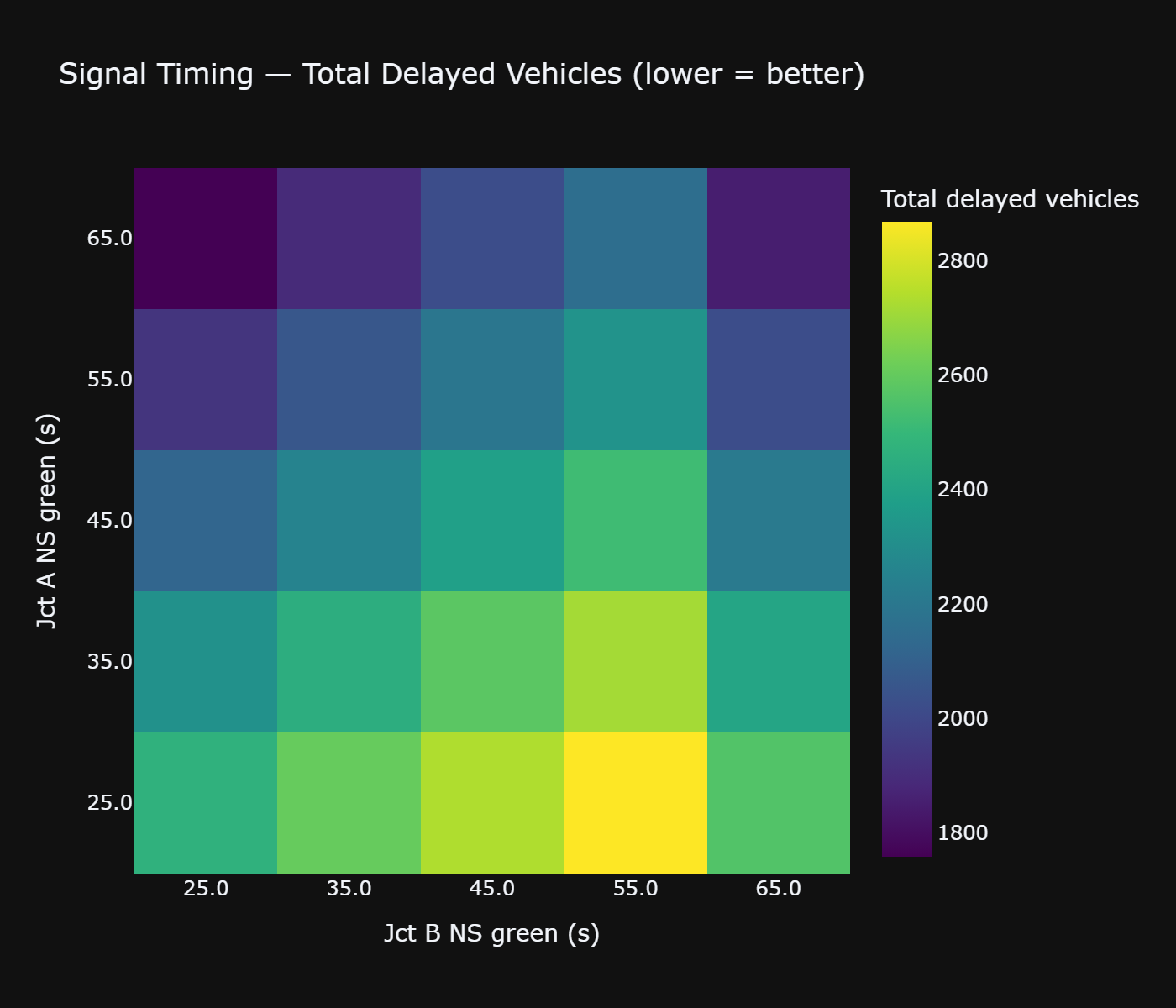
A heatmap showing delays, with varying signal times