Discrete-Event Simulation: SimWeave vs SimPy
A practical comparison using the classic Machine Shop tutorial, with Monte Carlo extensions and warehouse inventory optimisation.
Links to runnable notebooks, and a selection of plots found at the end of this article
Table of Contents
- Introduction
- What is Discrete-Event Simulation?
- The Machine Shop Tutorial
- Monte Carlo Replications
- Extending to Warehouse Inventory Optimisation
- Side-by-Side Comparison
- What's Next: Agent-Based Modelling
- Try it out yourself
Introduction
Queues are everywhere. Customers waiting at a bank, jobs queuing on a compute cluster, ambulances waiting for a bay at A&E. Discrete-Event Simulation (DES) is the tool that lets you model these systems and ask "what if?" questions — what happens to throughput if we add another server? What's the probability of running out of stock before the next resupply arrives?
SimPy is the mature, well-known Python DES library. SimWeave is a newer multi-paradigm engine that includes DES as one of its modes. This post compares both using SimPy's own Machine Shop tutorial as a benchmark, then shows where SimWeave goes further.
What is Discrete-Event Simulation?
In a DES model, time advances by jumping between events — a machine starts processing a part, a customer arrives, a server breaks down. Nothing happens between events; the simulation clock leaps forward to the next scheduled moment. This is in contrast to continuous simulation (where you integrate equations at every timestep) or agent-based simulation (where every agent acts every tick regardless of whether anything interesting is happening).
DES is the natural fit for:
- Queueing and service systems (call centres, hospitals, logistics)
- Manufacturing and supply chain
- Computer network performance
- Any system where discrete arrivals and service completions drive the dynamics
The Machine Shop Tutorial
SimPy's Machine Shop example is a classic. The scenario: a workshop has several machines that each process parts continuously. Occasionally a machine breaks down; a single repairman fixes one machine at a time. We want to know how many parts are made per unit time and how breakdowns affect throughput.
SimPy Implementation
SimPy uses Python generators and the yield statement to express concurrent processes. Each machine is a generator function; the yield env.timeout(...) line pauses the generator for a simulated duration and hands control back to the SimPy scheduler.
import simpy
import random

RANDOM_SEED = 42
NUM_MACHINES = 10
MTTF = 300       # mean time to failure (minutes)
REPAIR_TIME = 30 # mean repair time (minutes)
JOB_DURATION = 30
SIM_TIME = 4 * 60  # 4 hours

def machine(env, name, repairman):
    """A machine processes parts until it breaks; waits for the repairman."""
    while True:
        # Work for a random duration before breaking
        try:
            yield env.timeout(random.expovariate(1.0 / JOB_DURATION))
        except simpy.Interrupt:
            pass   # preempted by breakdown

        # Break down, request repairman
        with repairman.request(priority=1) as req:
            yield req
            yield env.timeout(random.expovariate(1.0 / REPAIR_TIME))

env = simpy.Environment()
repairman = simpy.PreemptiveResource(env, capacity=1)
machines = [machine(env, f"M{i}", repairman) for i in range(NUM_MACHINES)]
for process in machines:
    env.process(process)

env.run(until=SIM_TIME)
This is elegant for a single run. The generator pattern is idiomatic Python and co-operative multitasking is easy to reason about for small numbers of entities.
Where it gets harder:
- Running 1,000 Monte Carlo replicates requires you to wrap everything in a loop, rebuild all objects each time, collect results manually, and aggregate yourself.
- Adding continuous dynamics (e.g. the machine temperature rising toward failure) requires a separate ODE solver and careful coupling.
- Built-in plotting is out of scope — you collect data into lists and then call matplotlib yourself.
SimWeave Implementation
SimWeave uses a different abstraction: Entity objects that respond to a tick(dt, env) call each timestep, and an EventQueue for scheduling future callbacks. Instead of generators yielding timeouts, entities respond to the current clock state.
import numpy as np
import simweave as sw
from simweave.discrete import Queue, Service
from simweave.reliability import ReliableEntity, SubsystemSpec, RepairCentre

rng = np.random.default_rng(42)

# Each machine is a ReliableEntity with one subsystem (the machine itself)
machine_spec = SubsystemSpec(
    name="machine",
    failure_rate=1.0 / 300,   # mean time to failure = 300 min
    repair_time=30.0,          # mean repair time
    consumable=False,
    sku_index=0,
    unit_cost=0.0,
)

repair_centre = RepairCentre(capacity=1, buffer_size=50, name="repairman")

machines = [
    ReliableEntity(
        subsystems=[machine_spec],
        repair_centre=repair_centre,
        rng=np.random.default_rng(rng.integers(0, 2**32)),
        name=f"machine_{i}",
    )
    for i in range(10)
]

env = sw.SimEnvironment(dt=1.0, end=4 * 60)
env.register(repair_centre)
for m in machines:
    env.register(m)

env.run()

# Uptime is computed from the entity's operational history
for m in machines:
    print(f"{m.name}: availability = {m.operational_availability:.2%}")
Different clocking model
SimPy advances time by jumping directly between events — if nothing is scheduled for the next 50 minutes, it skips ahead. SimWeave uses an atomic clock with a fixed dt; every tick fires for every registered entity. This is intentional: it makes Monte Carlo aggregation trivial (samples are always aligned to the same time grid) and allows hybrid continuous+discrete models (you can run an ODE solver alongside discrete queues at the same clock rate). For sparse systems with rare events, SimPy's event-jump approach is faster. For dense systems where many entities are active most of the time — or where you want continuous dynamics alongside discrete events — SimWeave's approach is more convenient.
Monte Carlo Replications
This is where SimWeave shows one of its clearest advantages. Running many replicates with SimPy requires manually building a loop, re-creating all objects, and collecting results:
# SimPy — manual Monte Carlo
results = []
for seed in range(1000):
    random.seed(seed)
    env = simpy.Environment()
    # ... rebuild everything ...
    env.run(until=SIM_TIME)
    results.append(parts_made)

mean, std = np.mean(results), np.std(results)
With SimWeave's run_monte_carlo, the replication loop, seed management, and result aggregation are handled for you:
from simweave.mc import run_monte_carlo

def machine_shop_scenario(seed: int) -> dict:
    rng = np.random.default_rng(seed)
    repair_centre = RepairCentre(capacity=1, buffer_size=50)
    machines = [
        ReliableEntity(
            subsystems=[machine_spec],
            repair_centre=repair_centre,
            rng=np.random.default_rng(rng.integers(0, 2**32)),
        )
        for _ in range(10)
    ]
    env = sw.SimEnvironment(dt=1.0, end=4 * 60)
    env.register(repair_centre)
    for m in machines:
        env.register(m)
    env.run()

    return {
        "mean_availability": np.mean([m.operational_availability for m in machines]),
        "total_downtime_min": sum(m.total_downtime for m in machines),
    }

mc = run_monte_carlo(machine_shop_scenario, n_runs=500, seed=42,
                     executor="threads")

print(f"Mean availability : {mc.mean['mean_availability']:.2%}")
print(f"Std dev           : {mc.std['mean_availability']:.2%}")
The executor parameter supports "serial", "threads", and "processes" — switch to "processes" for CPU-bound scenarios and you get parallelism for free.
Visualising the Distribution
SimWeave's visualisation helpers produce publication-ready Plotly charts:
import simweave as sw

# Extract the availability samples as a 1-D array
avail_samples = np.array([r["mean_availability"] for r in mc.results])

fig = sw.plot_histogram(
    avail_samples,
    title="Machine Shop: Fleet Availability Distribution (500 runs)",
    xlabel="Mean Operational Availability",
    show_stats=True,    # adds mean ± 1σ lines
)
fig.show()
Fan plots for time series
When your scenario returns a full time series (not just a scalar), plot_mc_fan() draws the median trajectory with a shaded percentile band — a much cleaner way to show Monte Carlo uncertainty than overlaying 500 individual traces.
Extending to Warehouse Inventory Optimisation
SimPy's Machine Shop ends at breakdowns and repair. SimWeave's Warehouse and InventoryItems classes let you extend the model to ask: how many spare parts should we hold?
This is a realistic question for any asset-intensive operation — a factory keeping critical machine components, a fleet operator holding tyre stock.
from simweave.supplychain import InventoryItems, Warehouse

inventory = InventoryItems(
    part_names=["spindle", "motor"],
    unit_cost=[5_000.0, 2_200.0],
    stock_level=[4.0, 6.0],         # initial stock
    batchsize=[2.0, 2.0],           # reorder quantity
    reorder_points=[1.0, 2.0],      # trigger reorder when stock falls below this
    repairable_prc=[0.80, 0.95],    # 80% of spindles can be repaired, not replaced
    repair_times=[7.0, 3.0],        # days to repair
    newbuy_leadtimes=[21.0, 14.0],  # days to procure new
)
warehouse = Warehouse(inventory=inventory, name="parts_store")
Now wire the machines to the warehouse by adding warehouse=warehouse to each ReliableEntity. When a machine fails, it checks the warehouse for the required part; if none is available, the machine waits (additional downtime accrues).
Optimising Reorder Points
Run a sensitivity sweep across (reorder_point_spindle, reorder_point_motor) to find the combination that minimises total_cost = holding_cost + downtime_cost:
from simweave.reliability import sensitivity_sweep

def shop_cost(reorder_spindle: float, reorder_motor: float, seed: int) -> float:
    inv = InventoryItems(
        part_names=["spindle", "motor"],
        unit_cost=[5_000.0, 2_200.0],
        stock_level=[4.0, 6.0],
        batchsize=[2.0, 2.0],
        reorder_points=[reorder_spindle, reorder_motor],
        repairable_prc=[0.80, 0.95],
        repair_times=[7.0, 3.0],
        newbuy_leadtimes=[21.0, 14.0],
    )
    warehouse = Warehouse(inventory=inv)
    repair_centre = RepairCentre(capacity=1, buffer_size=50)
    machines = [
        ReliableEntity(subsystems=[machine_spec], warehouse=warehouse,
                       repair_centre=repair_centre,
                       rng=np.random.default_rng(seed + i))
        for i in range(10)
    ]
    env = sw.SimEnvironment(dt=1.0, end=365)   # 1 year
    env.register(warehouse, repair_centre, *machines)
    env.run()
    return warehouse.total_cost + sum(m.total_downtime * 50 for m in machines)

result = sensitivity_sweep(
    shop_cost,
    param1_name="reorder_spindle",
    param1_values=[1, 2, 3, 4, 5],
    param2_name="reorder_motor",
    param2_values=[1, 2, 3, 4, 5],
    metric_name="Total Annual Cost (£)",
    n_runs=20,
    seed=0,
)

fig = sw.plot_sensitivity_surface(result, chart_type="heatmap",
                                  title="Inventory Optimisation Heatmap")
fig.show()
The resulting heatmap shows total cost across the 5×5 grid of reorder-point combinations. The lowest-cost cell is the recommended stocking policy. Running 20 Monte Carlo replicates per cell means the cost estimate accounts for stochastic variability — you're not optimising against a single lucky or unlucky run.
Analytical Steady-State Optimisation
Simulation sweeps are thorough but slow. If you already have a reliable estimate of mean demand rates for each part (from historical data, or from an initial simulation run), SimWeave also provides closed-form and differential-evolution optimisers that skip the simulation entirely:
from simweave.supplychain.optimization import poisson_reorder_points, cost_optimise_stock

# Attach known demand rates to the warehouse (parts consumed per day)
warehouse._demand_rate = np.array([0.008, 0.011])  # spindle, motor

# Fast Poisson heuristic — independent per-SKU, runs in milliseconds
k_poisson, cost_p = poisson_reorder_points(warehouse, target_availability=0.90)

# Global DE optimiser — trades cheap parts against expensive ones to hit
# the service level at minimum total holding cost
k_de, cost_de = cost_optimise_stock(warehouse, target_availability=0.90, maxiter=200)

print(f"Poisson heuristic  : reorder at {k_poisson},  cost £{cost_p:,.0f}")
print(f"DE optimiser       : reorder at {k_de},  cost £{cost_de:,.0f}")
The Poisson heuristic treats each SKU independently and is effectively instantaneous — useful for a quick planning estimate or as a warm-start for the DE. The DE optimiser finds the global minimum cost subject to the availability constraint, allowing it to hold less stock of expensive parts and compensate with higher stock of cheap ones. A pareto_sweep() function plots the full cost–availability trade-off curve if you want to see the frontier before committing to a target.
The natural workflow is to use the analytical optimisers for planning and initial sizing, then validate with a Monte Carlo simulation sweep once the design is narrowed down.
This analysis goes well beyond what a standalone SimPy script typically does, not because SimPy can't be extended that way, but because SimWeave provides the scaffolding (Warehouse, optimisers, sensitivity_sweep, plot helpers) out of the box.
Side-by-Side Comparison
| Capability | SimPy | SimWeave |
|---|---|---|
| Core DES abstraction | Generator/yield | Entity/tick + EventQueue |
| Time advancement | Event-jump (efficient for sparse systems) | Fixed-step atomic clock (good for dense/hybrid) |
| Learning curve | Low — straightforward Python generators | Low-Medium — entity/tick pattern |
| Maturity | Very mature (v4.x, since 2013) | Newer (v0.8.0) |
| Documentation | Extensive, many examples | Growing |
| Monte Carlo | DIY loop | Built-in run_monte_carlo, aggregation, fan plots |
| Continuous dynamics | External (couple via shared state) | Native — same clock, ContinuousProcess |
| Supply chain / inventory | External | Built-in Warehouse, InventoryItems |
| Sensitivity sweeps | DIY | Built-in sensitivity_sweep |
| Visualisation | External (matplotlib/plotly) | Built-in Plotly helpers |
| Community | Large | Small but growing |
When to use SimPy: You have a straightforward queueing or process-flow model, you want a library with years of community examples, or you're working with students who know Python generators.
When to use SimWeave: You want Monte Carlo with minimal boilerplate, you need hybrid continuous+discrete models, your simulation has supply-chain or reliability components, or you want interactive Plotly visualisations without assembling your own plotting layer.
What's Next: Agent-Based Modelling
Both SimPy and SimWeave take a process-flow view of the world: entities arrive, get served, and depart. A different paradigm is Agent-Based Modelling (ABM), where every agent has its own state and decision rules, and emergent macro-behaviour arises from local micro-interactions.
The leading Python ABM library is Mesa. In a future post we'll compare SimWeave and Mesa on a shared scenario, examining how the paradigm choice (process-flow vs agent) changes what questions are easy to ask, what system behaviours are natural to model, and where the two approaches complement each other rather than compete.
Try it out yourself
Full runnable code is in the companion notebook.
Selection of Visuals from this Blog
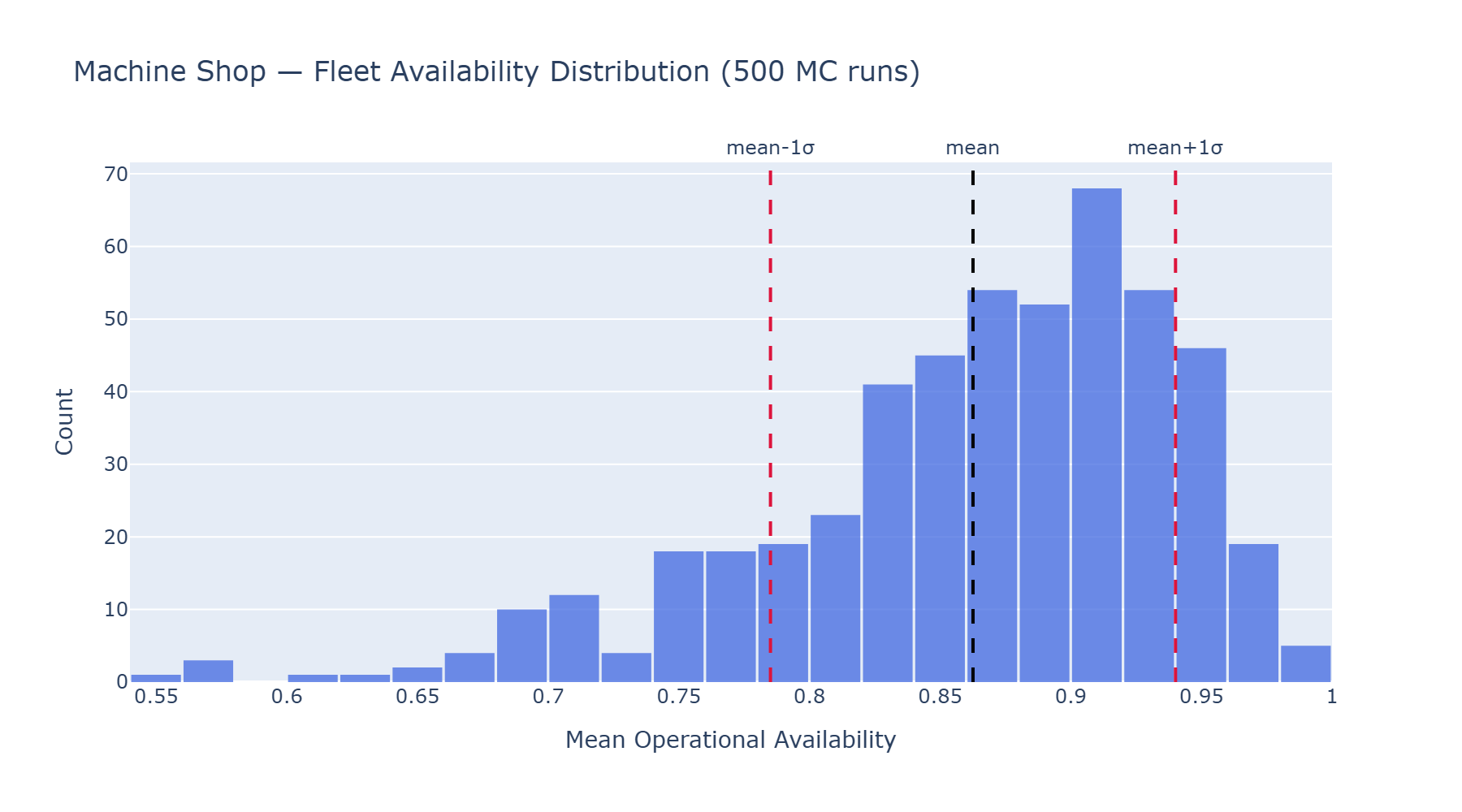
A histogram showing Operational Availability across Monte-Carlo repeated runs.
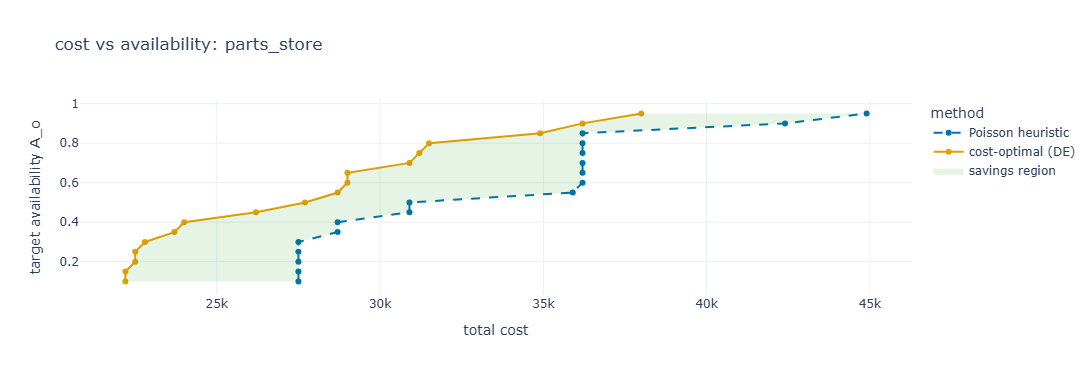
Cost Optimisation with Differential Evolution, or inverse Poisson result with cost savings highlighted
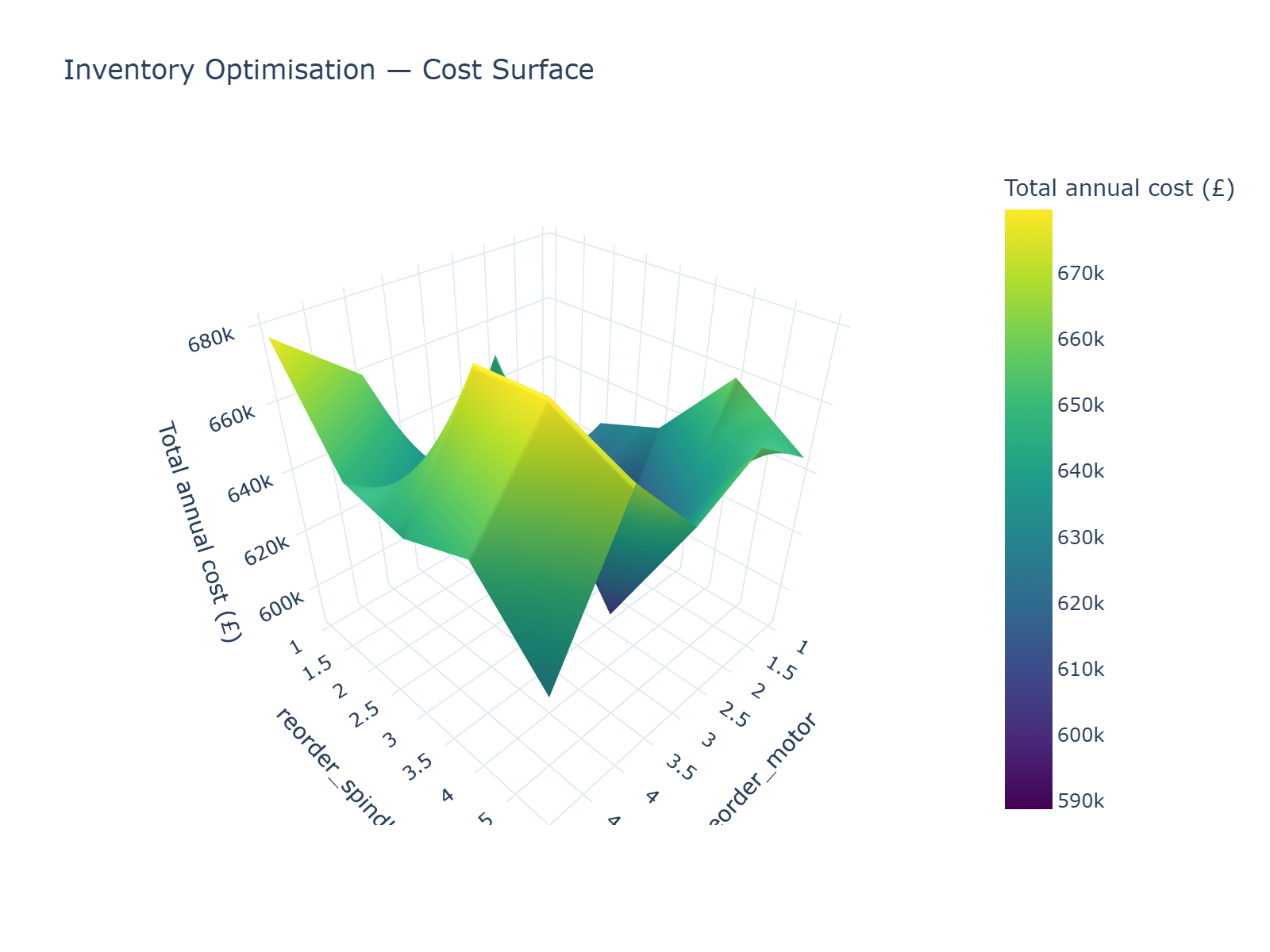
Sensitivity Analysis, results shown as Surface Plot.