Synthetic Datasets for Predictive Maintenance
Using SimWeave's fault injection module to generate physics-grounded, labelled training data for RUL estimation and fault classification.
Links to runnable notebooks, and a selection of plots found at the end of this article
Table of Contents
- Introduction
- The Core Idea
- Visualising the Data
- Connecting to an ML Pipeline
- Beyond Motor Windings
- What SimWeave Adds vs DIY
- What's Next
- Try it Out Yourself
Introduction
Predictive maintenance (PdM) promises a simple deal: instrument your equipment, watch the sensor signals, and intervene before failure rather than after. The economics are compelling — unplanned downtime in manufacturing costs around $260,000 per hour on average, and modern ML models can predict remaining useful life (RUL) with impressive accuracy.
There's a catch. To train those models you need failure data — thousands of examples of equipment degrading and failing across different operating conditions, fault types, and degradation rates. Real failure data is slow to collect (you have to let equipment fail, repeatedly, which is expensive and sometimes dangerous), class-imbalanced (healthy states vastly outnumber failure states), and often proprietary.
The benchmark datasets used in the academic literature — NASA's CMAPSS aircraft engine dataset, the PRONOSTIA bearing data, PHM08 — are excellent but limited. They cover specific systems, specific fault modes, and fixed operating conditions. Adapting models trained on jet engine data to an industrial pump or a wind turbine gearbox requires either new data collection or a lot of domain adaptation work.
Physics-based synthetic data generation offers a different path. If you can model the system mathematically, you can simulate it degrading under any fault profile you choose — linear wear, sudden overload, exponential fatigue — and generate as many labelled examples as you need. The challenge is building the simulation infrastructure to do that cleanly.
This is exactly what SimWeave's faults module is designed for.
The Core Idea
SimWeave models physical systems as ordinary differential equations (see the continuous dynamics module). A healthy motor winding, a suspension strut, or an electrical circuit are each described by a set of parameters (thermal resistance, spring stiffness, capacitance) and a derivatives() function.
The insight is that most degradation faults are parameter faults — insulation breaks down and thermal resistance rises; a bearing race develops spalling and vibration increases; a capacitor ages and capacitance drops. If you know the physics, you can express the fault as a time-varying perturbation of one or more model parameters.
SimWeave's FaultInjector wraps any DynamicSystem and applies those perturbations at each integration step. The result looks identical to simulate() — same SimulationResult object, same API — but the state trajectories reflect the degrading physics. FaultDataset.from_result() then annotates every time sample with a health index, RUL, and failure mode label, ready for ML training.
Step 1: Model the Healthy System
We'll use a motor winding as a running example. The lumped-capacitance thermal model (ThermalRC) captures the essentials: a heat input Q (motor losses), a thermal resistance R (winding insulation), and a thermal capacitance C (winding mass × specific heat). Temperature evolves as:
At steady state the winding runs at \(T_\text{ss} = T_\text{amb} + Q \cdot R\). If insulation degrades and R rises, the steady-state temperature climbs toward a damage threshold.
import numpy as np
import simweave as sw

AMBIENT = 293.15   # 20 °C in Kelvin
Q_IN    = 50.0     # constant heat input (W)
DT      = 0.5      # integration step (s)
T_SPAN  = (0.0, 1200.0)  # 20-minute run

healthy_system = sw.ThermalRC(
    thermal_resistance=2.0,          # K/W — nominal insulation
    thermal_capacitance=800.0,       # J/K — winding thermal mass
    ambient_temperature=AMBIENT,
    initial_temperature=AMBIENT,
)

def constant_heat(t: float) -> float:
    return Q_IN

healthy_result = sw.simulate(healthy_system, T_SPAN, dt=DT, inputs=constant_heat)

# Steady-state winding temperature
T_ss = AMBIENT + Q_IN * 2.0
print(f"Healthy steady-state: {T_ss - AMBIENT:.1f} K above ambient")  # 100 K
Nothing new here — this is standard SimWeave continuous simulation. The healthy run establishes the baseline signal that the fault will perturb.
Step 2: Define a Degradation Profile
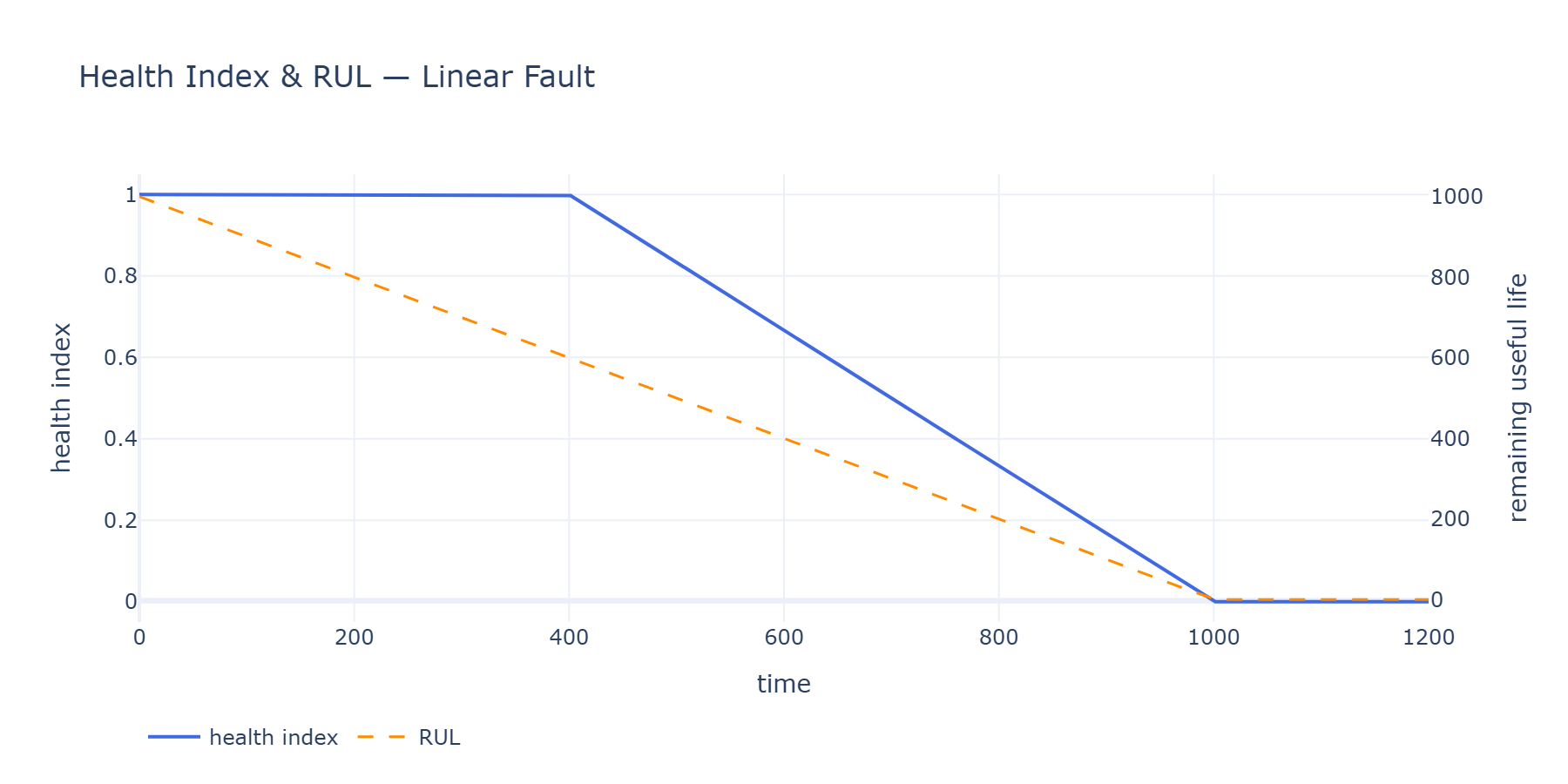
FaultProfile describes when a fault begins, when it causes full failure, what shape the degradation takes, and what label to attach to the failure mode:
from simweave.faults import FaultProfile

# Degradation begins at 400 s, full failure at 1000 s
linear_profile = FaultProfile(
    onset_time=400.0,
    failure_time=1000.0,
    mode="insulation_loss_linear",
    shape="linear",           # uniform wear
)

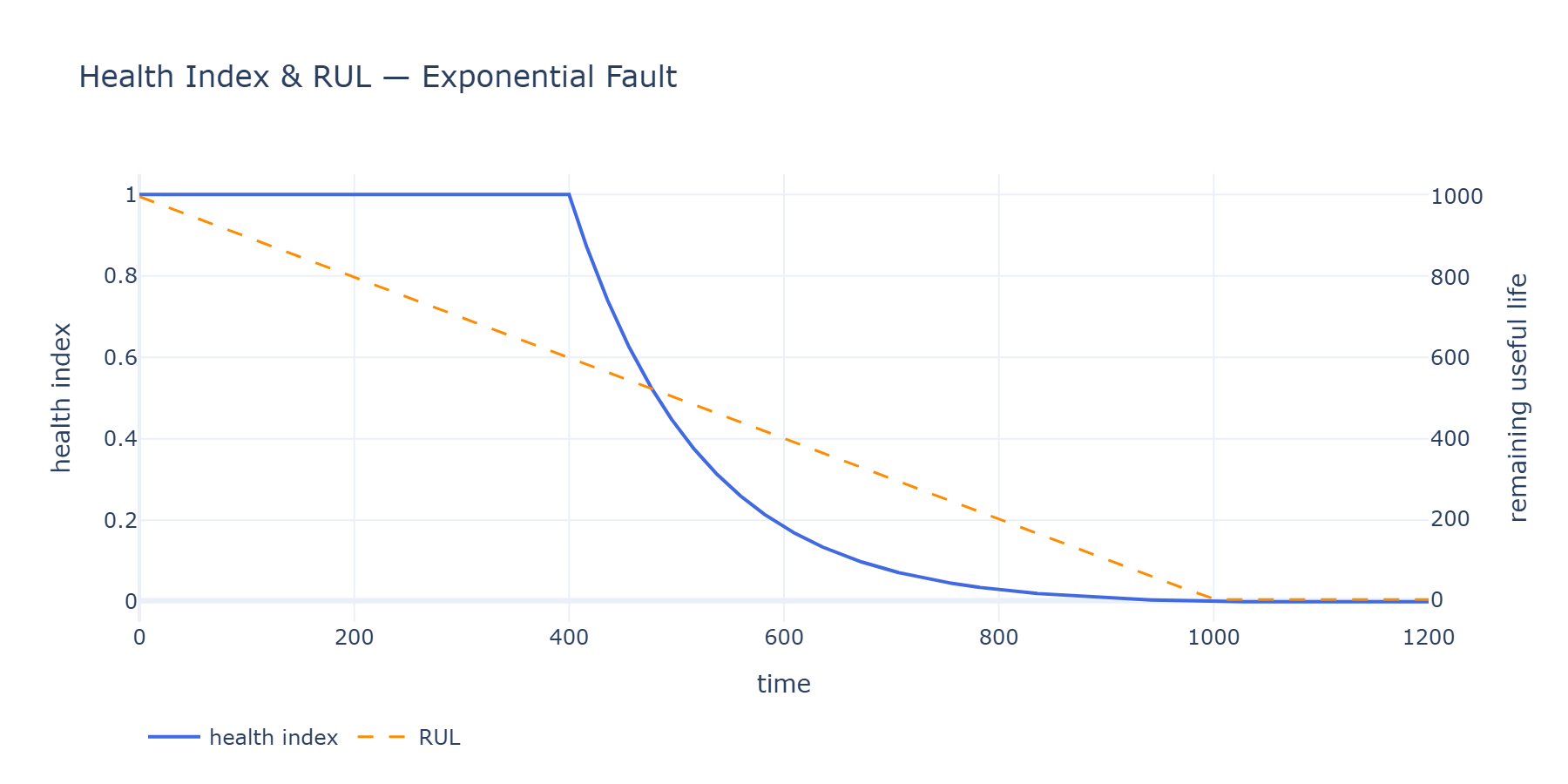
exponential_profile = FaultProfile(
    onset_time=400.0,
    failure_time=1000.0,
    mode="insulation_loss_exp",
    shape="exponential",      # slow start, rapid deterioration — typical of fatigue
)

abrupt_profile = FaultProfile(
    onset_time=600.0,
    failure_time=601.0,       # essentially instant
    mode="thermal_runaway",
    shape="abrupt",
)
The three built-in shapes cover the most common physical degradation mechanisms:
| Shape | Physical analogy | Health index trajectory |
|---|---|---|
"linear" |
Uniform corrosion, steady wear | Falls steadily from 1.0 to 0.0 |
"exponential" |
Fatigue crack propagation, electrolytic aging | Flat for most of life, then rapid collapse |
"abrupt" |
Overload event, sudden short circuit | Drops to 0.0 at onset |
callable |
Any custom degradation law | You provide f(progress) -> health ∈ [0, 1] |
Custom degradation curves
The shape parameter accepts any callable that maps progress ∈ [0, 1] to health ∈ [0, 1]. This lets you model Weibull failure distributions, piecewise degradation (early burn-in, steady wear, end-of-life rapid decline), or profiles derived from your own asset history data.
def weibull_degradation(progress: float) -> float:
    """Weibull CDF-shaped health — mimics infant-mortality then wearout."""
    import math
    k, lam = 2.5, 0.8   # shape, scale
    cdf = 1.0 - math.exp(-(progress / lam) ** k)
    return 1.0 - cdf

profile = FaultProfile(400, 1000, mode="weibull_wear", shape=weibull_degradation)
Step 3: Attach the Fault to a Parameter
ParameterFault maps a degradation profile to a specific model parameter. The param argument is the attribute name on the wrapped system object — any float attribute works.
from simweave.faults import ParameterFault

linear_fault = ParameterFault(
    param="R_th",    # stored attribute name — rises as insulation degrades
    profile=linear_profile,
    max_delta=3.0,   # at full failure, R_th = nominal × (1 + 3.0) = 4×
    relative=True,   # perturbation is multiplicative
)
At each RK4 integration step, the injector computes the current fault fraction f = 1 - health_index(t), sets R_th = 2.0 × (1 + 3.0 × f), evaluates derivatives(), then restores the nominal value. This restoration step is important — RK4 evaluates derivatives() four times per step and each evaluation must see the correct time-varying parameter.
The result: as the fault evolves, the winding heats up faster and reaches a higher steady-state temperature, exactly as a degrading insulating material would behave in reality.
Step 4: Simulate the Faulted System
FaultInjector is itself a DynamicSystem, so simulate() accepts it without modification:
from simweave.faults import FaultInjector

linear_injector = FaultInjector(system=sw.ThermalRC(2.0, 800.0, AMBIENT, AMBIENT),
                                 faults=[linear_fault])

linear_result = sw.simulate(linear_injector, T_SPAN, dt=DT, inputs=constant_heat)
The SimulationResult is identical in structure to a healthy run — .time, .state, .state_labels. The difference is entirely in the physics: the state trajectory reflects the degraded system.
Step 5: Build a Labelled Dataset
FaultDataset.from_result() annotates every time sample with the labels an ML model needs:
from simweave.faults import FaultDataset

# Add realistic sensor noise (±0.3 K standard deviation)
linear_ds = FaultDataset.from_result(
    linear_result,
    linear_injector,
    noise_std=0.3,
    rng=np.random.default_rng(42),
)

print(linear_ds)
# FaultDataset(2401 samples, features=['T_winding'],
#              modes=['healthy', 'insulation_loss_linear'], 156 failed)
Every FaultDataset exposes:
linear_ds.time           # (N,)       — simulation timestamps
linear_ds.features       # (N, F)     — state + inputs, optionally noise-corrupted
linear_ds.feature_names  # ['T_winding', 'u0', ...]
linear_ds.health_index   # (N,)       — 1.0 = healthy, 0.0 = failed
linear_ds.rul            # (N,)       — remaining useful life (seconds)
linear_ds.is_failed      # (N,)  bool — True after failure_time
linear_ds.failure_mode   # (N,)  str  — "healthy" or the profile's mode label
The noise_std parameter can be a scalar (same noise on all features) or a per-feature array — useful when you have sensors with different precision or signal-to-noise ratios.
Step 6: Build a Multi-Mode Training Corpus
A single run produces one trajectory. Real PdM models are trained on hundreds or thousands. Run multiple scenarios and stack them:
def make_run(shape: str, mode_label: str, seed: int) -> FaultDataset:
    profile = FaultProfile(
        onset_time=400.0, failure_time=1000.0,
        mode=mode_label, shape=shape,
    )
    fault = ParameterFault("R_th", profile, max_delta=3.0, relative=True)
    injector = FaultInjector(system=sw.ThermalRC(2.0, 800.0, AMBIENT, AMBIENT),
                              faults=[fault])
    result = sw.simulate(injector, T_SPAN, dt=DT, inputs=constant_heat)
    return FaultDataset.from_result(result, injector, noise_std=0.3,
                                    rng=np.random.default_rng(seed))

# Build a corpus: healthy baseline + two fault modes
rng = np.random.default_rng(0)

healthy_injector = FaultInjector(system=sw.ThermalRC(2.0, 800.0, AMBIENT, AMBIENT), faults=[])
healthy_result = sw.simulate(healthy_injector, T_SPAN, dt=DT, inputs=constant_heat)
healthy_ds = FaultDataset.from_result(healthy_result, healthy_injector, noise_std=0.3, rng=rng)

corpus = FaultDataset.concat([
    healthy_ds,
    make_run("linear",      "insulation_loss_linear",      seed=10),
    make_run("exponential", "insulation_loss_exponential", seed=20),
])

train_ds, test_ds = corpus.train_test_split(test_frac=0.2, rng=np.random.default_rng(99))

print(f"Total samples : {len(corpus):,}")
print(f"Train / test  : {len(train_ds):,} / {len(test_ds):,}")
print(f"Feature cols  : {corpus.feature_names}")
For a statistically robust training set, loop over parameter variations (different max_delta values, different onset times, different noise levels) and call FaultDataset.concat() to aggregate. The physics ensure every example is internally consistent — you're not hand-crafting synthetic signals, you're running the physics with different degradation scenarios.
Scaling up with Monte Carlo
Combine with run_monte_carlo to generate a large, statistically varied corpus efficiently:
from simweave.mc import run_monte_carlo

def random_scenario(seed: int) -> FaultDataset:
    rng = np.random.default_rng(seed)
    onset    = rng.uniform(200, 600)
    failure  = onset + rng.uniform(300, 700)
    max_dR   = rng.uniform(1.0, 5.0)      # vary fault severity
    noise    = rng.uniform(0.1, 0.8)       # vary sensor quality
    shape    = rng.choice(["linear", "exponential"])

    profile = FaultProfile(onset, failure, mode=f"insulation_{shape}", shape=shape)
    fault   = ParameterFault("R_th", profile, max_dR, relative=True)
    inj     = FaultInjector(sw.ThermalRC(2.0, 800.0, AMBIENT, AMBIENT), [fault])
    result  = sw.simulate(inj, T_SPAN, dt=DT, inputs=constant_heat)
    return FaultDataset.from_result(result, inj, noise_std=noise,
                                    rng=np.random.default_rng(seed + 1))

mc = run_monte_carlo(random_scenario, n_runs=200, seed=0, executor="threads")

# mc.results is a list of FaultDataset objects
big_corpus = FaultDataset.concat(mc.results)
print(f"MC corpus: {len(big_corpus):,} samples across {len(mc.results)} runs")
200 runs takes a few seconds on a modern laptop. You now have a training set with 200 distinct degradation trajectories spanning a range of onset times, severities, and noise levels — all physically consistent.
Visualising the Data
Two dedicated plot helpers come with the module.
Fault signal view
plot_fault_signals overlays all state channels with shaded regions marking the degradation window (orange) and post-failure period (red):
fig = sw.plot_fault_signals(
    linear_result, linear_injector,
    title="Motor winding — linear insulation loss",
)
fig.show()
The resulting plot shows the temperature rising at an increasing rate once insulation loss begins — physically intuitive. The shaded bands make the onset and failure times immediately legible, which is useful when presenting to domain engineers who need to validate the simulation against their experience of how the equipment actually fails.
What the plots reveal
With a linear profile, the temperature curve has a clear change of slope at the onset time — a practitioner would describe this as "the motor started running hotter than normal from around 400 seconds."
With an exponential profile, the early signal is almost indistinguishable from healthy — the fault is "silent" for most of its life — then temperature shoots up rapidly in the last 20% of the degradation window. This is the hardest case for any monitoring system and the most common failure mode in real fatigue-driven degradation.
Health index and RUL view
plot_health_index shows both quantities on dual axes — perfect for validating that the labels are behaving as expected before feeding the data into a model:
fig = sw.plot_health_index(linear_ds, show_rul=True,
                           title="Health index and RUL — linear fault")
fig.show()
Health index falls linearly from 1.0 to 0.0 between onset and failure. RUL is flat (infinite, plotted as NaN) before onset, then counts down linearly to zero. This dual-axis view is a standard sanity check in PdM engineering and reassuring to share with colleagues who are sceptical of simulation-generated labels.
Connecting to an ML Pipeline
FaultDataset is designed to drop straight into standard Python ML workflows.
Pandas export
import pandas as pd

df = corpus.to_dataframe()
# Columns: time, T_winding, [any inputs], health_index, rul, is_failed, failure_mode

print(df.groupby("failure_mode")["rul"].describe().round(1))
print(df["failure_mode"].value_counts())
NumPy arrays for PyTorch / Keras
# RUL regression — predict time to failure from current sensor readings
X_train = train_ds.features        # (N_train, F)
y_rul   = train_ds.rul              # (N_train,) — regression target

# Fault classification — identify which failure mode is active
y_mode  = train_ds.failure_mode     # (N_train,) — strings, encode with sklearn LabelEncoder

# Binary fault detection
y_fault = (~train_ds.is_failed).astype(float)  # 1 = healthy, 0 = failed
A minimal PyTorch LSTM for RUL regression:
import torch
import torch.nn as nn

# Reshape into sequences: (n_sequences, sequence_length, n_features)
SEQ_LEN = 30
X = torch.tensor(train_ds.features, dtype=torch.float32)
y = torch.tensor(train_ds.rul.clip(0, 600), dtype=torch.float32)

# Sliding window
sequences = X.unfold(0, SEQ_LEN, 1)          # (N - SEQ_LEN + 1, F, SEQ_LEN)
sequences = sequences.permute(0, 2, 1)       # (N - SEQ_LEN + 1, SEQ_LEN, F)
targets   = y[SEQ_LEN - 1:]

class RULPredictor(nn.Module):
    def __init__(self, n_features, hidden=64):
        super().__init__()
        self.lstm   = nn.LSTM(n_features, hidden, batch_first=True)
        self.linear = nn.Linear(hidden, 1)

    def forward(self, x):
        _, (h, _) = self.lstm(x)
        return self.linear(h[-1]).squeeze(-1)

model = RULPredictor(n_features=train_ds.features.shape[1])
Infinite RUL before onset
Before fault onset, rul is float('inf'). For regression targets, clip to a maximum value (e.g. the simulation length) or train only on the degradation and failed windows by masking train_ds.is_failed | (train_ds.health_index < 1.0).
Beyond Motor Windings
The ParameterFault / FaultInjector pattern generalises to any SimWeave continuous model. Here are some physical scenarios to consider:
| System | Fault | Parameter | Effect on signal |
|---|---|---|---|
ThermalRC — motor winding |
Insulation loss | R_th ↑ |
Temperature rises |
ThermalRC — heat sink |
Fouling | R_th ↑ |
Slower cooling, higher peak T |
MassSpringDamper — isolator |
Spring fatigue | stiffness ↓ |
Resonant frequency drops |
MassSpringDamper — damper |
Seal leak | damping ↓ |
Oscillation rings longer |
QuarterCarModel — suspension |
Shock absorber wear | damping ↓ |
Increased body oscillation after bump |
SeriesRLC — power supply capacitor |
Capacitor aging | C ↓ |
Higher ripple voltage |
SeriesRLC — cable insulation |
Dielectric loss | R ↑ |
Increased resistive heating |
The code pattern is identical in each case — swap the system, choose the degrading parameter, and the rest of the pipeline (FaultProfile, FaultDataset, plot helpers, ML export) stays the same.
What SimWeave Adds vs DIY
The alternative is to write all of this yourself: pick a scipy ODE solver, implement parameter perturbation at each step (remembering to restore values for multi-evaluation integrators), write the label generation logic, handle infinite RUL, build the train/test split, and glue together a plotting layer. It's a few hundred lines of plumbing that most PdM practitioners write once, imperfectly, and then maintain.
SimWeave provides the plumbing so you can focus on the questions that matter: which degradation shape best represents the fault mechanism?, how much sensor noise is realistic?, does the ML model generalise across fault severities?
The FaultDataset.concat / run_monte_carlo combination is particularly useful — it turns "generate 500 training runs" from an afternoon's scripting into a few lines of code and a wait of a few seconds.
What's Next
This post covered parameter faults on continuous models. Future developments in SimWeave will extend this to:
- Sensor faults — stuck sensors, bias drift, and intermittent noise modelled at the dataset level independently of the underlying physics.
- Multi-component systems — injecting faults into
ReliableEntityfleets and generating maintenance datasets that include both physics signals (vibration, temperature) and operational signals (queue depth, repair history). - Domain randomisation at scale — systematic variation of operating conditions (load profiles, ambient temperature), not just fault profiles, to train models robust to distribution shift.
The goal is a single, coherent path from physics model to production-ready PdM training dataset — without leaving Python.
Try it out yourself
Full runnable code is in the companion notebook.
Selection of Visuals from this Blog
A histogram showing Operational Availability across Monte-Carlo repeated runs.
A histogram showing Operational Availability across Monte-Carlo repeated runs.